






Comment demander mon numéro de compte UPS ?
Guide étape par étape pour créer ou localiser votre numéro de compte UPS via UPS.com. Inclut le dépannage des problèmes courants de configuration de compte.
Guide étape par étape
Obtenez votre numéro de compte UPS
Si vous n'avez pas encore de numéro de compte UPS, rendez-vous sur ups.com et créez un nouveau compte UPS. Au cours du processus d'inscription, vous devrez fournir vos informations personnelles et vos coordonnées de paiement.
→ https://www.ups.com
Log in or sign up on UPS.com
Go to https://www.ups.com and log in with your UPS.com credentials, or register a new account at the UPS signup page.
→ https://wwwapps.ups.com/doapp/signup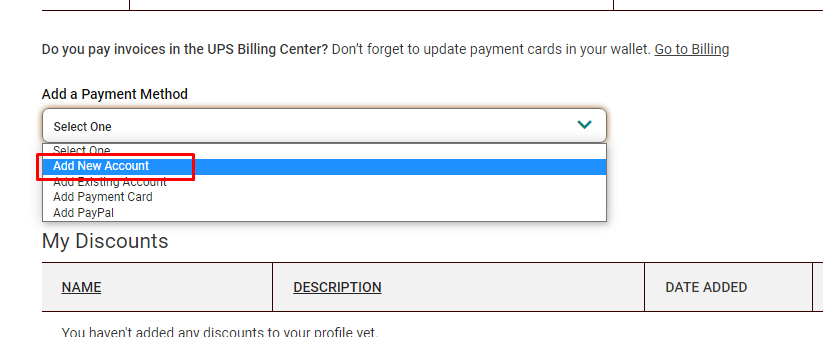
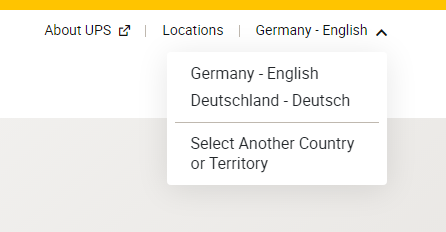
Make sure the correct country or territory is selected
During registration, confirm that the correct country or territory is selected so your UPS Account Number is created for the right region.

Locate your UPS Account Number
After you successfully sign up, find your UPS Account Number on the confirmation page or in the email from accountconfirm@ups.com.
Trouvez votre numéro de compte après l'inscription
Après vous être inscrit avec succès pour un nouveau compte UPS, vous devriez trouver votre numéro de compte UPS sur la page de confirmation ou recevoir un e-mail de : mclogin@ups.com avec votre nouveau numéro de compte UPS. Vous pouvez également le trouver sur votre page Méthodes de paiement.
→ https://www.ups.com/lasso/login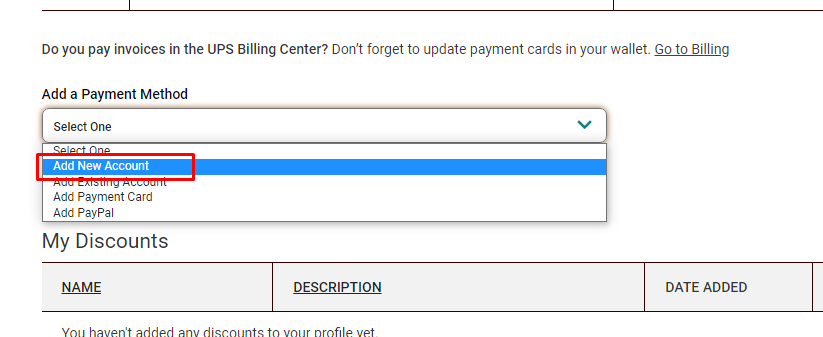
Navigate to UPS payment settings
Open the UPS payment settings page at https://wwwapps.ups.com/ppc/ppc.html/payment while you are logged in to your UPS.com account.
→ https://wwwapps.ups.com/ppc/ppc.html/paymentSelect "Add a payment method"
On the payment page, select "Add a payment method" and open the dropdown menu.
→ https://wwwapps.ups.com/ppc/ppc.html/paymentClick "Add new Account"
In the dropdown, choose "Add new Account" to create a new UPS Account Number.
→ https://wwwapps.ups.com/ppc/ppc.html/paymentVerify the new UPS Account Number
After you create the new account, verify that your new UPS Account Number is visible on the payment page with method type "Account".
→ https://wwwapps.ups.com/ppc/ppc.html/payment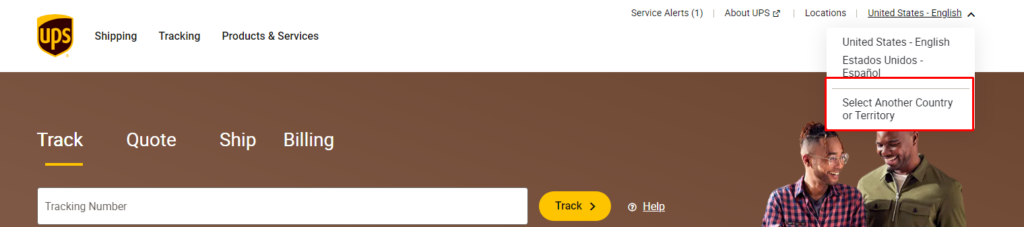
Vérifiez le numéro de compte
Dès que vous avez créé un nouveau numéro de compte UPS, il devrait être visible sur votre page Méthodes de paiement avec la méthode "Compte".
→ https://wwwapps.ups.com/ppc/ppc.html/payment
Check your inbox for the UPS confirmation email
Look for an email from accountconfirm@ups.com containing your existing UPS Account Number.
Navigate to UPS payment settings
If the account number is not listed yet, open https://wwwapps.ups.com/ppc/ppc.html/payment.
→ https://wwwapps.ups.com/ppc/ppc.html/paymentSelect "Add a payment method"
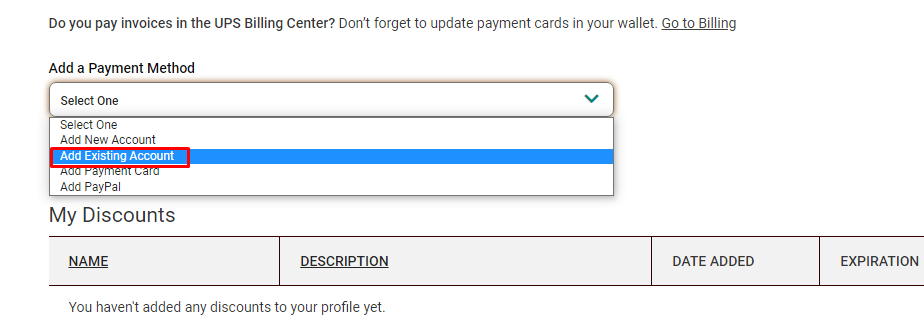
On the payment page, select "Add a payment method" and open the dropdown.
→ https://wwwapps.ups.com/ppc/ppc.html/paymentClick "Add Existing Account"
In the dropdown, choose "Add Existing Account" and follow the prompts to link your existing UPS Account Number.
→ https://wwwapps.ups.com/ppc/ppc.html/paymentVous avez déjà un numéro de compte UPS existant
Si votre numéro de compte UPS n'est pas répertorié sur votre page Méthodes de paiement, vous pouvez l'ajouter en naviguant vers la page et en cliquant sur "Ajouter un compte existant" sous "Ajouter une méthode de paiement". Si vous rencontrez des problèmes pendant ce processus, veuillez nous contacter et assurez-vous de décrire ce qui se passe en détail, idéalement accompagné d'une capture d'écran.
→ https://wwwapps.ups.com/ppc/ppc.html/payment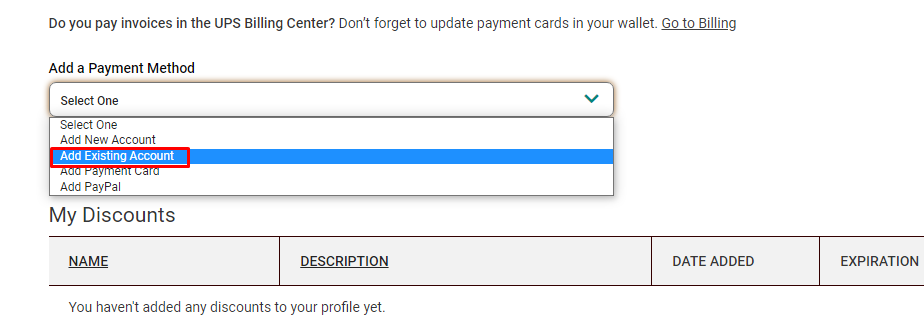
Check for a fraud or security message
If UPS blocks the operation and displays a fraud or security warning instead of completing the account creation or linking, note the message shown.
Call your local UPS Customer or Technical Service
Contact your local UPS Customer or Technical Service representative using the phone number shown in the message or on UPS.com.
→ https://www.ups.comFind your local UPS Technical Support number
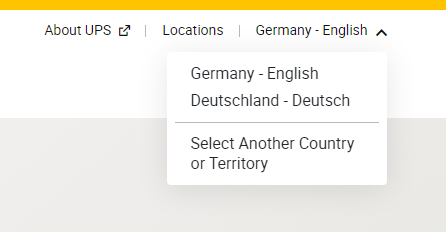
If you cannot reach anyone under the provided number, go to the UPS contact page, select the correct territory, and call the listed Technical Support number.
→ https://www.ups.com/de/en/support/contact-us.page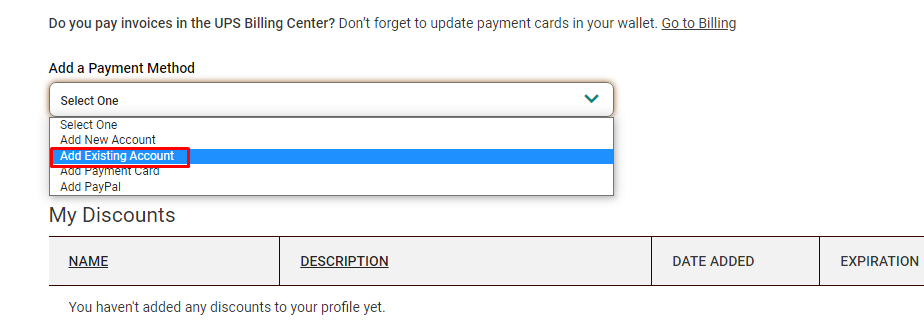
Open a support ticket for additional help
If you still have issues getting or linking your UPS Account Number, open a support ticket with us so we can assist you further.
Dépannage
Parfois, UPS considère cette opération comme frauduleuse et ne continue pas le processus de génération ou de liaison d'un numéro de compte UPS. Au lieu de cela, il ne termine pas cette étape. Dans ce cas, veuillez contacter le support UPS et leur dire que vous avez besoin d'un numéro de compte UPS à activer. Les coordonnées du support local UPS peuvent être trouvées sur ups.com.