






Wie fordere ich meine UPS-Kontonummer an?
Schritt-für-Schritt-Anleitung zur Erstellung oder Auffindung Ihrer UPS-Kontonummer über UPS.com. Beinhaltet Problemlösungen für häufige Kontoeinrichtungsprobleme.
Schritt-für-Schritt-Anleitung
Holen Sie sich Ihre UPS-Kontonummer
Wenn Sie noch keine UPS-Kontonummer haben, gehen Sie zu ups.com und erstellen Sie ein neues UPS-Konto. Während des Anmeldevorgangs werden Sie aufgefordert, Ihre persönlichen Informationen und Zahlungsdetails anzugeben.
→ https://www.ups.com
Log in or sign up on UPS.com
Go to https://www.ups.com and log in with your UPS.com credentials, or register a new account at the UPS signup page.
→ https://wwwapps.ups.com/doapp/signup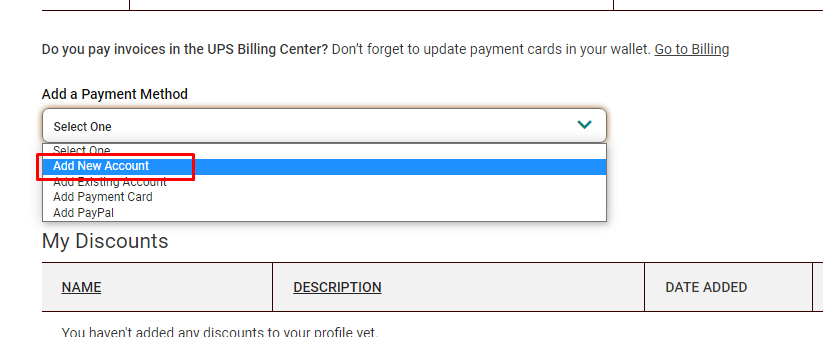
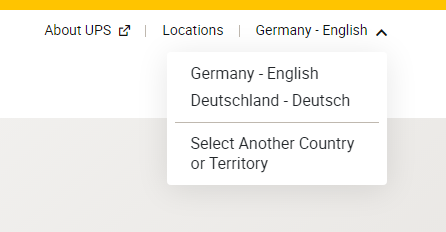
Make sure the correct country or territory is selected
During registration, confirm that the correct country or territory is selected so your UPS Account Number is created for the right region.

Locate your UPS Account Number
After you successfully sign up, find your UPS Account Number on the confirmation page or in the email from accountconfirm@ups.com.
Finden Sie Ihre Kontonummer nach der Anmeldung
Nachdem Sie sich erfolgreich für ein neues UPS-Konto angemeldet haben, sollten Sie Ihre UPS-Kontonummer auf der Bestätigungsseite finden oder eine E-Mail von: mclogin@ups.com mit Ihrer neuen UPS-Kontonummer erhalten. Sie können sie auch auf Ihrer Seite für Zahlungsmethoden finden.
→ https://www.ups.com/lasso/login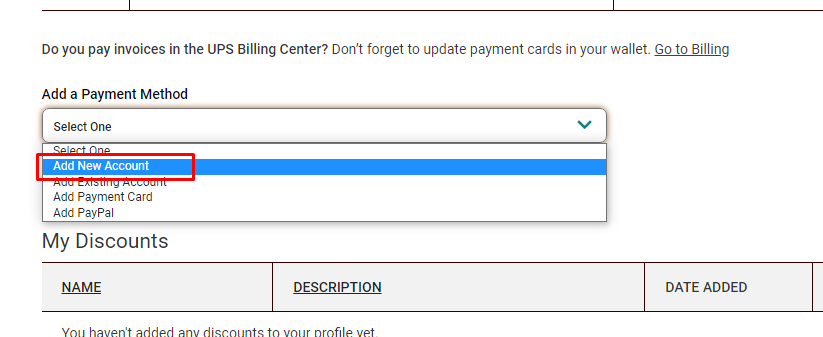
Navigate to UPS payment settings
Open the UPS payment settings page at https://wwwapps.ups.com/ppc/ppc.html/payment while you are logged in to your UPS.com account.
→ https://wwwapps.ups.com/ppc/ppc.html/paymentSelect "Add a payment method"
On the payment page, select "Add a payment method" and open the dropdown menu.
→ https://wwwapps.ups.com/ppc/ppc.html/paymentClick "Add new Account"
In the dropdown, choose "Add new Account" to create a new UPS Account Number.
→ https://wwwapps.ups.com/ppc/ppc.html/paymentVerify the new UPS Account Number
After you create the new account, verify that your new UPS Account Number is visible on the payment page with method type "Account".
→ https://wwwapps.ups.com/ppc/ppc.html/payment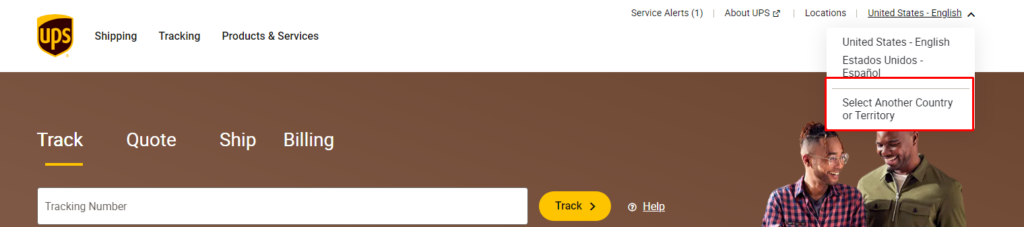
Kontonummer überprüfen
Sobald Sie eine neue UPS-Kontonummer erstellt haben, sollte diese auf Ihrer Seite für Zahlungsmethoden mit der Methode "Konto" sichtbar sein.
→ https://wwwapps.ups.com/ppc/ppc.html/payment
Check your inbox for the UPS confirmation email
Look for an email from accountconfirm@ups.com containing your existing UPS Account Number.
Navigate to UPS payment settings
If the account number is not listed yet, open https://wwwapps.ups.com/ppc/ppc.html/payment.
→ https://wwwapps.ups.com/ppc/ppc.html/paymentSelect "Add a payment method"
On the payment page, select "Add a payment method" and open the dropdown.
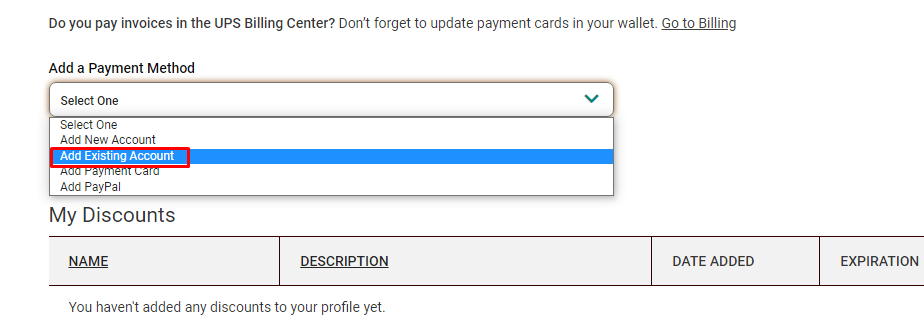
→ https://wwwapps.ups.com/ppc/ppc.html/paymentClick "Add Existing Account"
In the dropdown, choose "Add Existing Account" and follow the prompts to link your existing UPS Account Number.
→ https://wwwapps.ups.com/ppc/ppc.html/paymentBereits eine vorhandene UPS-Kontonummer haben
Wenn Ihre UPS-Kontonummer nicht auf Ihrer Seite für Zahlungsmethoden aufgeführt ist, können Sie sie hinzufügen, indem Sie zur Seite navigieren und auf "Vorhandenes Konto hinzufügen" unter "Zahlungsmethode hinzufügen" klicken. Sollten Sie während dieses Prozesses auf Probleme stoßen, kontaktieren Sie uns bitte und beschreiben Sie detailliert, was passiert, idealerweise begleitet von einem Screenshot.
→ https://wwwapps.ups.com/ppc/ppc.html/payment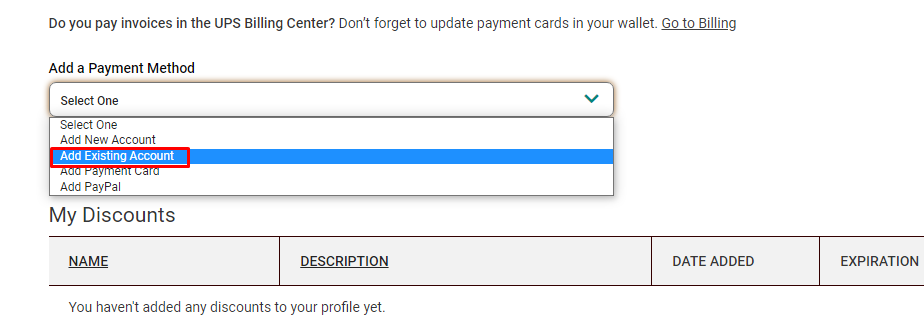
Check for a fraud or security message
If UPS blocks the operation and displays a fraud or security warning instead of completing the account creation or linking, note the message shown.
Call your local UPS Customer or Technical Service
Contact your local UPS Customer or Technical Service representative using the phone number shown in the message or on UPS.com.
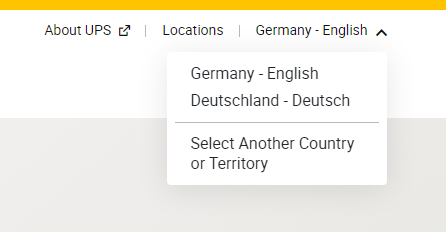
→ https://www.ups.comFind your local UPS Technical Support number
If you cannot reach anyone under the provided number, go to the UPS contact page, select the correct territory, and call the listed Technical Support number.
→ https://www.ups.com/de/en/support/contact-us.page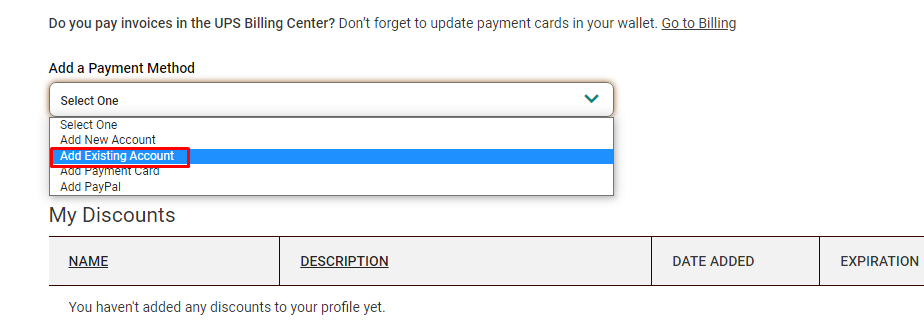
Open a support ticket for additional help
If you still have issues getting or linking your UPS Account Number, open a support ticket with us so we can assist you further.
Fehlerbehebung
Manchmal kennzeichnet UPS diese Operation als betrügerisch und setzt den Prozess zur Erstellung oder Verknüpfung einer UPS-Kontonummer nicht fort. Stattdessen wird dieser Schritt nicht abgeschlossen. In diesem Fall kontaktieren Sie bitte den UPS-Support und teilen Sie ihnen mit, dass Sie eine UPS-Kontonummer aktivieren müssen. Die Kontaktdaten des lokalen UPS-Supports finden Sie auf ups.com.